This page is about the game, not about you. It needs no imported history, and it is the doorway to the per-character pages, where a character's whole movelist lives with its startup, block and hit frames.
The lead paragraph on the page states the provenance: the corpus comes from wavu, published under CC0, and it names the game version it was pulled against. Frame data is valid per patch, so the version is the part that matters when you are checking a number against something you read elsewhere.
If you arrive from a URL that names no character, the page says so at the top and offers the nearest match by spelling. One wrong letter is the likeliest thing about a hand-typed name, and landing silently on the full roster is hard to tell apart from a broken site. A guess that is too far off is not offered at all, because sending you to a character you never asked about is worse than saying nothing.
Compare the roster
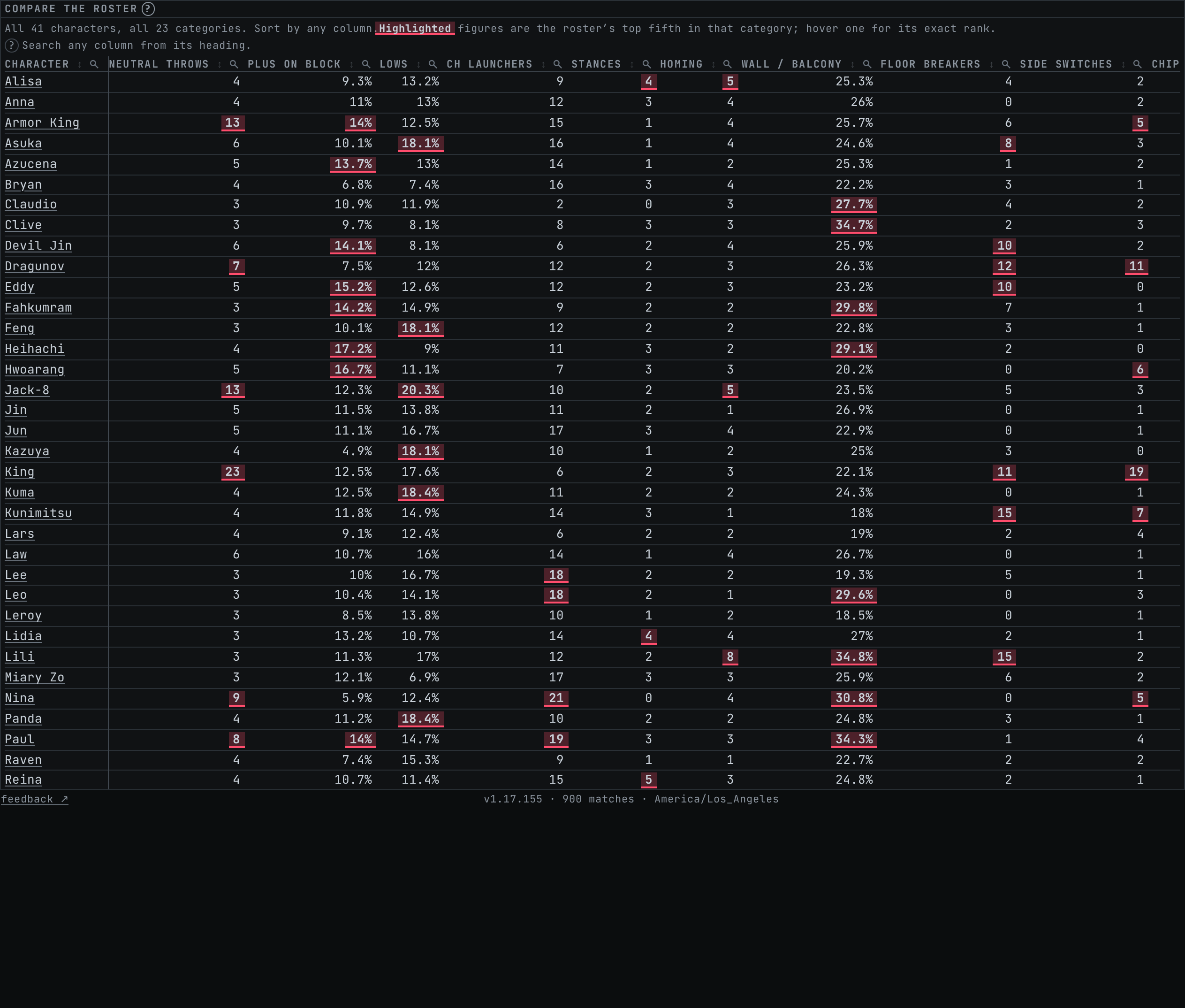
Every character against every measured category, in one wide table. A per-character page can tell you a character ranks third for some property; it cannot show you who the other forty are. "Evasive compared to whom" is the question a matchup raises, and it needs the whole column to answer.
Each column sorts, so any of these questions can be asked by clicking its heading. The cycle runs descending, ascending, then back to the roster's own alphabetical order. The character column stays frozen against the left edge while the rest scrolls sideways, which is what keeps a number attached to a name on a phone.
A highlighted figure is in the roster's top fifth for that category. The highlight is a tint because bold weight in a monospace face is close to invisible at this size, and it carries the same fact as hidden text for anyone who cannot see the tint. Ties are only marked when the whole tied group fits inside the fifth, so a five-way tie on the boundary does not paint five cells as though they were exceptional.
Hover or focus any figure for that character's exact value and their rank. Under the table sits a single pinned row of roster medians, because a number in isolation says very little and repeating the median in every cell would say less.
Below that is a row of chips, one per category, each holding its own definition. Read them before drawing conclusions, since the categories are not all counted the same way. Wherever a raw count would mostly rank movelist size, the figure is a share instead, and shares divide by strikes alone: throws are not part of what you have to block.
What none of this can see is movement, oki and execution, and those decide most matches. Treat the table as a description of what a character is made of rather than a ranking of who is good.
Characters
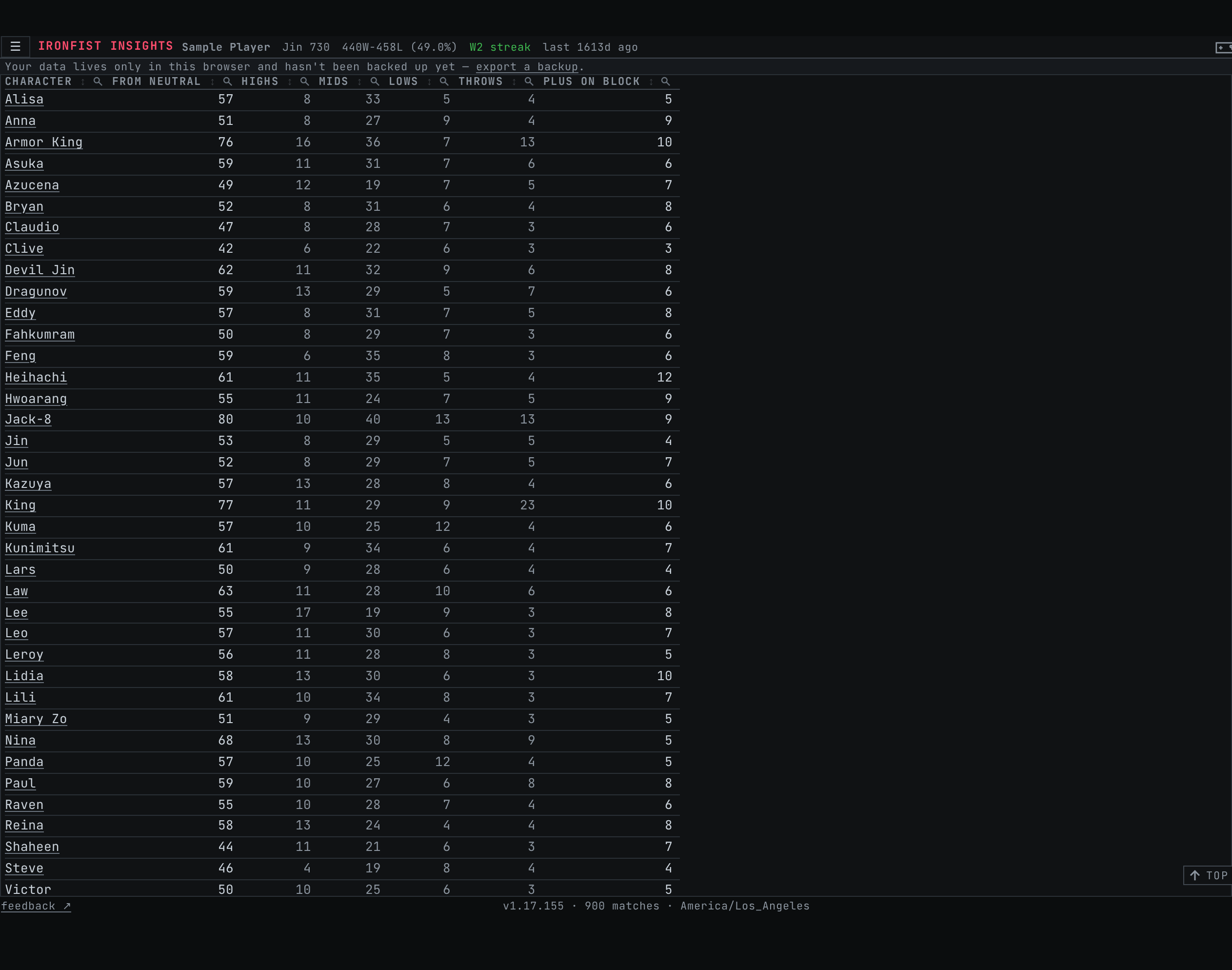
The roster as a table of counts, one row per character, linking to that character's own page.
Every count is what the character can start from neutral: no string in progress, no state to be in, no stance already earned. That rules out while-standing and crouch-dash options along with Heat and stance entries, so every figure here is a floor and not a total. The column labels carry the definition because the numbers are unreadable without it.
From neutral is the headline count, and Highs, Mids, Lows and Throws split it by what you have to deal with. Plus on block counts how much of that is your turn afterwards, and it excludes two things deliberately: moves the opponent can guard during your recovery, and moves whose published advantage spans zero depending on spacing. Neither is free pressure, and counting them would overstate every character on the roster.
There is no external authority that settles any of these definitions. No official source publishes a move, throw or hit-level count for any character, and the community trackers import their data from the same place this site does, so agreeing with them proves only that the import worked. King is defensibly anywhere from two dozen to well over a hundred throws depending on where you draw the line. Given that, the label has to carry the definition, which is why these are labelled the way they are.
The same sorting rules apply here, and each heading also opens a search box for its own column.
Where to go next
Reading the frame data pages walks the columns on a character page one at a time: what each measurement means, which end of a range is quoted, and where the conventions come from.
Using frame data is the one to read if the numbers make sense and you are not yet sure what to do with them.
The glossary defines the vocabulary, and the notation guide covers the input styles you can switch between in settings.